So long Mint, Hello Quicken

In 2007 I started to use Mint.com. I used it side by side with Microsoft Money. In 2008 I stopped using Microsoft Money because the product was put out to pasture. Microsoft Money served me well for about 6 years, starting in 2001. It was one of the reasons I starting using my PC more than my Mac.

Anyway, I think Mint.com sort of sucks now. Here is why:
  1. They frequently can't connect to my financial institutions. They could not connect to Fidelity for over a week.
  2. They frequently duplicate my transactions. For a few days, every single Wells Fargo transaction was duplicated
  3. Their automatic "renaming" and "categorization" feature sucks. It doesn't work. For example, every purchase at my grocery store "Bert's Red Apple" is named "Apple Computer" an categorized as electronics
  4. For 5 months now, my investment accounts don't have charts
  5. My 401 cost basis and balances are never the same as Fidelity
From what I can tell, no one is working on the software.

So I did something I swore I would never do (credit to Mike Torres for convincing me). I purchased Quicken 2011. And while I feel like I am stuck in the 90s sometimes, I have to give Intuit credit for actually improving the product from the last time I tried it (2009). I can deal with the fact that the dialogs look like Windows 95, and that the "Preferences" entry is under "Edit" (a throwback to the Mac origins of Quicken) and that there seems to be two features that control everything around categories and renames because at the end of the day Quicken makes me feel in control of my finance and budget. I can actually project my cashflow and bills over the next 30 days, and see my investment performance... 

Anyways, it feels good to be back, and it's always easiest to start with a new finance package in January so that come December, I can track my performance against my budget and financial goals.

Mail Me, my first Windows Phone 7 app

One of my goals over the holiday break was to learn how to write a Windows Phone 7 application. Well my app is now published to the app store. I had a lot of fun writing it and hope you enjoy it.

One thing that I do a lot is send myself email messages. It's a bit cumbersome to do this on the phone so I decided to write an application to make this just a few quick taps  (when pinned to the start screen).

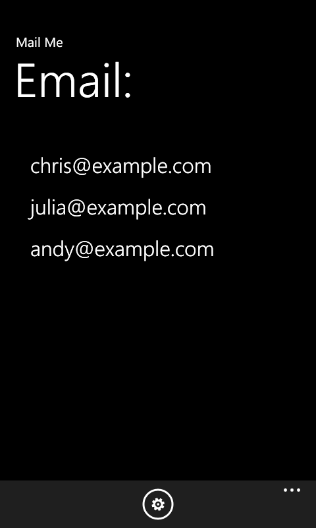
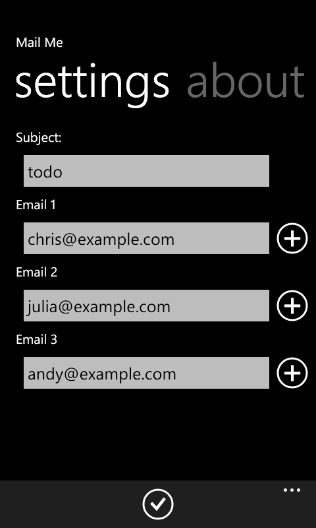
Mail Me allows you to configure a pre-determined subject line and up to 3 email addresses (only 1 in trial mode) to send mail to. Selecting an address will then bring up the mail compose screen on your phone allowing you to type the body and hit send.

This application is really quite simple but it exercises a bunch of functionality on the phone. Learning Silverlight was a bit of a challenge at first since I'm a pure Windows Forms and ASP.NET (hobby) developer. Anyways, hopefully this app is of use to you. The trial version doesn't nag you or anything and you can use that as long as you want if you just need to quickly send email to a single address.

In my case I configure all 3: my personal email, my work email, and my Remember The Milk task inbox (creates tasks via email).

In the future, I hope to be able to add such features as recording and attaching a voice note once the phone APIs allow that (currently you can record audio but cannot attach it to an email).

You can get the app here.

LinkedIn: now see who viewed your profile

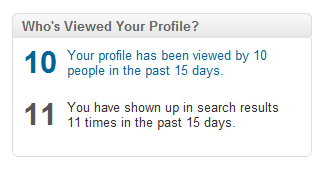
I have to say, I was surprised by this. Today when I logged into the new LinkedIn (funny, I didn’t see any news on this) I noticed that there was a prominent area to click and see who has looked at my profile. I have used this feature in the past, and it simply showed you “anonymous” viewing data, like “Group Program Manager from Microsoft” viewed your profile. I never got to see who was the actual viewer.

Image001

Upon clicking the link today, I was asked to make my name, photo and title viewable to other people on Profile Stats in order to see any profile stats for my profile.

Image003

When you click on the profile view settings you get this screen which goes into more detail.

Image002

I find this all very fascinating. LinkedIn is pushing the envelope on privacy here (and getting consent).

I wonder how far off Facebook is from shipping this.

Use retention policies to clean out mail

Warning: this post is only interesting if you work somewhere that uses Outlook + Exchange and have retention policies enabled.

I subscribe to a lot of distribution lists at work that get a lot of traffic. I generally “scan” this lists and delete most of the stuff monthly. But that can result in almost a gigabyte of email taking up space in my inbox, syncing etc.

Well, using retention policies you can specify how long to keep mail in a folder before automatically deleting it. Simply right click on a folder, select properties and set the amount of time you want to keep email.

In this case, I only want the last weeks’ worth of email from the Windows Phone 7 DL since each week generates a few thousand messages.

Image001

Dear iPhone... you are fired.

Over the past 2 and a half years you have had a profound impact on my life. I took you everywhere, photographed and took videos of my daughter growing up... you provided countless hours of entertainment, kept me connected to my office, my friends and family, and let me consume news and media on the go. You were there when my son was born, you traveled the world with me, and let me find things effortlessly.

However, I have grown tired of you. As an enterprise device, you have completely failed. Each update of iOS brings more problems with Exchange support. You fundamentally don't understand what it means to talk to an Exchange server since your programmers don't use Exchange for their jobs. I put up with months of email hangs, years of poorly formated emails, calendar appointments went missing from my calendar, and you still don't understand that it's important when you look someone up in the corporate directory that you show their office location. After 2 years of this, I'm convinced you'll never figure this out. I put up with it though because you were the best lifestyle phone around.

Sure, I'll miss you. But I'll get over it. You're a mature operating system with amazing hardware design. However, I won't miss the fact that your proximity sensor still doesn't work and I can't reliably make phone calls. But I will miss your glass and metal  hardware... I no longer go to the App store and feel that giddy feeling when there are new updates to my apps. Rather, it feels like all the applications these days are focused on fixing bugs and dealing with testing software across numerous versions and hardware. And now, I have practically every app I want or need. You might have 300,000 apps in your app store, but I rely on a dozen.

To be honest, I wasn't sure I could do this. But I really appreciate and like the fresh approach my Windows Phone 7 offers around, notifications, a back button, a dedicated camera button I can use when the phone is locked, contact management, social feed integration, and edge to edge fluid design for my music and pictures on facebook and Windows Live. You should really check it out. For one thing, a lot of the applications that exist on the iPhone actually look and feel better on Windows Phone. And the soft keyboard is a dream!

Anyways, it's been real.

-Omar

PS - You should think about ditching iTunes, it's really holding you back.

Protect your Live ID now

One of the most important things you can do these days is secure your online email accounts and identities. It is the Achilles heel of your life. It so happens that almost any online account you have can be compromised if someone gets access to your email account. They can reset your Facebook account, any eCommerce account, Amazon account etc.

So how can you ensure that you are protected? Google, Yahoo and Microsoft provide a number of tools to protect you. They come in the form of "proofs". A proof is like a secondary form of identification to ensure that yes, you really are who you are.

When you go and get a Passport, Driver's license etc you are usually required to show 2 forms of identification. This provides a higher level of proof proving who you are. Email accounts are gaining many similar capabilities, and these tools are there to protect you from the bad guys who are trying to steal your email account.

I am going to focus on what we've done in Windows Live to help protect your account. In my opinion the features below represent an industry leading set of tools to keep you in control of what is arguably one of your most important assets. I'm really proud of the breadth of tools here.

First lets start with the most basic forms of reset tools, 1) secret question & answer and 2) secondary email account.

Secret Question & Answer

There is nothing secret about these answers. This is a pretty much completely useless way to protect your account. They are the lowest common denominator for recovering your password should you forget it, but they are also incredibly easy for hackers to defeat. 

My recommendation is to use completely garbage characters as your answers (and store these somewhere). This way someone can't social engineer their way into your account.

Microsoft Research published an great paper on the ineffectiveness of this tool.

Secondary Account

This is another common way to gain access to your account if you forget your password. However, this is not much better than a Secret Question & Answer unless your secondary email account is sufficiently difficult to hack, phish or social engineer.

I happen to use my Microsoft email address as my secondary account because the security measures our IT department places on our email accounts and passwords is close to what a bank would have in place to protect your bank accounts. My password cannot be "reset" and the IT department enforces strict password policies and requires you to change your password frequently.

However, for people that don't have a work email account, the worst thing you can do is to set your secondary account to another webmail provider where you probably use the same password and secret questions & answers making it easy for a hacker to hack both your accounts.

SMS Proof

An SMS proof is a way to add your mobile phone number as a way to secure your account. Certain tasks like resetting your password, adding a Trusted PC (more on that later) and notifications about important account changes can utilize your phone as a powerful tool to protect your account.

It's very difficult for an attacker to gain access to your phone, and even more difficult to spoof / social engineer access to your phone number. As a result this is a very cost effective and easy mechanism to protect your account.You all have a mobile phone so...

YOU SHOULD ALL DO THIS NOW

All the major services I know of allow you to protect your account with an SMS proof. Windows Live takes this one step further by allowing you to use Single Use Codes to temporarily gain access to your account from an untrustworthy environment (like a kiosk).

To add your SMS number to your Windows Live Account just go to http://account.live.com and complete the steps to add your Mobile Phone.

Smsproof

Trusted PC

Trusted PC is a really neat way to protect and re-gain access to your account. You basically tell Windows Live to trust the computers that you use frequently, like your home PC, laptop, or Work PC. If your account were to get compromised you can easily re-gain access to your account just by logging in from your Trusted PC. This provides a near immediate and simple way to both protect and recover your account in the case of the bad guy hacking into your Live ID.

I highly recommend you add at least 2 trusted PCs to your account so that account recovery is a simple process in the unfortunate event you get hacked like I did a few years ago.

You can add a Trusted PC by installing Windows Live Essentials.

For more background on Trusted PC see this blog post by John Scarrow, the GM of Safety Services in Windows Live.

Resetting your password
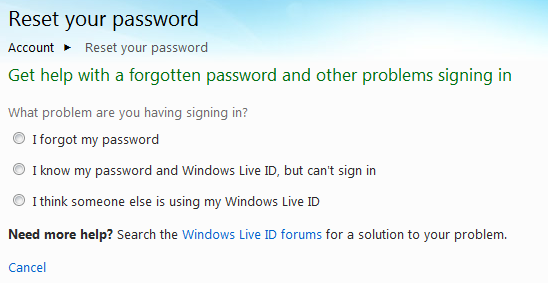
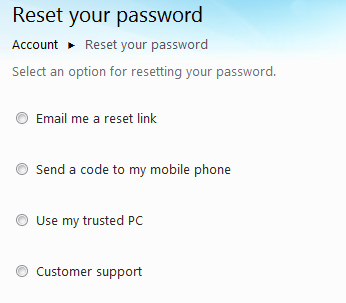
Now when you need to reset your password you'll get the following choices:

Reset

And if you select any of these options you get a list of choices depending on the kinds of proofs you have.

Trusted

Go protect your account now!
Apple TV is still a hobby

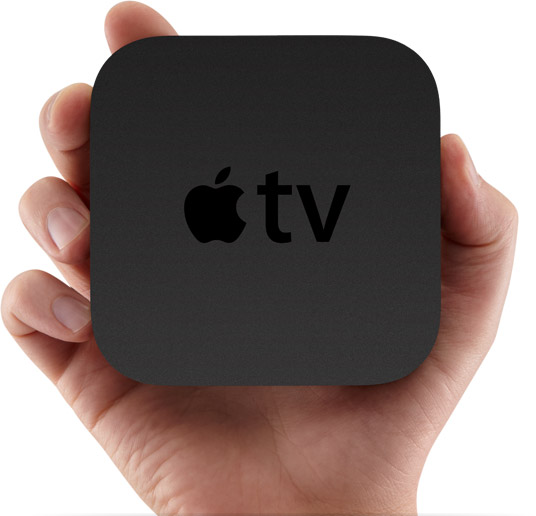
A few days go I received my Apple TV. The box was comically small, and the contents smaller. However, that's where the fun ended.

Whatis_gallery_slide120100901

The Apple TV is still a hobby for Apple. For $99 I wasn't too worried about it being a dud, for it does have one useful feature: Netflix streaming. However, this is by no means the best Netflix streaming experience. That belongs to Xbox and Windows 7 Media Center.

There are a few things that surprised me about the Apple TV, especially compared to the previous version which I also own.
  1. It only supports 720p. I have no idea why.
  2. You cannot download / watch movies that aren't available for rental. In order to do this you need to have iTunes running on a PC in the home, turned on with the content you want to watch.
  3. Its got an IR remote.
  4. Can't use AirPlay yet

#1 is just weird when the previous Apple TV supported 1080p.

#2 is what makes the device rather silly. Apple doesn't have much rental TV content. But the fact that I have to use a PC, or iPod and purchase gigabytes of crap just to watch a TV episode once?

When will Apple make a device that doesn't require iTunes for something critical? Cut the cord already.

#3 is also weird. I mean, the thing is so small my plan was to velcro it to the back of the TV. But no RF remote? And no support for HDMI-CEC?

#4 is a bit unexpected since a bunch of early adopters got this device and can't use one of the touted features. Perhaps this will make the Apple TV more useful, but I find it curious that Apple is not touting AirPlay as "open" or using DLNA which is basically the same thing, except with broad industry support. I wonder if AirPlay is Apple's attempt to hoist their dock connector control on the ecosystem to lock out other folks who don't license from them.

I look forward to getting my Boxee box and comparing it to the Apple TV. But for now, I don't expect to use this much.