Kindle Paperwhite

I think I am going to give this blog thing another go. The Kindle Paperwhite is my 4th e-ink Kindle. All in all between my wife and I we've owned every Kindle except for the original touch. Each on has brought some kind of major improvement in technology. Each one has improved on the e-ink technology.

It's amazing to think that the original kindle cost $399, had a keyboard and lots of buttons and the latest Paperwhite has no keyboard and no buttons (except power).

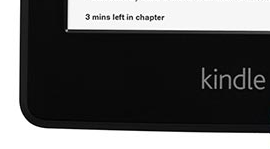
The first few times I used the Paperwhite I have to say I was underwhelmed. My wife has the "el cheapo" Kindle. Whatever the name is for the $79 one. On our 15 hour flight from Seattle to Dubai she was really jealous. The back lit screen is really great for a dark cabin. And my other favorite feature is the estimated time to finish a chapter. This feature is unique to the Paperwhite and it's really amazing. When you are trying to negotiate trips to the bathroom or reading in between meals it’s awesome to know how long it will take to finish reading something.

time to read

And in the end, this to me is what makes software so magical. An analog book can't tell you it will take you 3 minutes to finish the chapter. And this is a great example of a feature that I never knew I needed.

Coming up with these kind of features is very hard. Because everyone in software has a long list of things to do that people have asked for or are deficiencies in the product. Most software folks could dedicate 100% of their time to addressing these issues. But you have to make time to invent things people will appreciate and thank you for, and counter the risks that you could build something useless that could drive away your customers.

It's these kind of features which really endear people to what you make. I hope Amazon brings this feature to other Kindles but for now this uniquely differentiates the Paperwhite beyond just the backlit display.

Touch

My daughter is in Kindergarten and one day they sent her home with some instructions on how to use a computer reading program that I could download And install.

The instructions to install looked pretty hideous but one night I sat down and did it. It’s some kind of licensed software that the school district  uses and it’s an app that runs on Mac OS, Windows XP - Windows 7. Yeah, you know what I’m talking about. An App, not a web site which is what it should be.

Anyways, I loaded this thing up expecting the worst. I installed it on our Windows 8 All In One PC that has a 24 inch touch screen. This application was not designed for touch. It runs at 800 x 600.

After installing I put my little girl in front of the thing. She started to use the mouse because that’s what she is using at School since their computers are all Macs.

Watching a 6 year old use a mouse designed for an adult made me squirm a bit. It just wasn’t working. She was clicking the right mouse button instead of the left one.

So I said: Sarah, touch the screen. And within 5 seconds she was flying through the lessons with her fingers. She was easily 2-3 times faster than if she were using the mouse.

When you see your kids use computing, and learn, and gravitate and excel with a mode of input that didn’t exist 6 years ago you can see the world changing.

People thought that typing on a 3.7 inch glass screen was absurd when most folks only had chiclet keyboards. No one thinks that’s absurd any more. Touching a PC screen because it's faster and better and more natural is going to be normal if it isn’t already.

Touch isn’t just for phones and tablets. Just ask my kid.

24 Hours with Surface

I’ve had a love affair with gadgets since I was in 3rd grade and I’ve been fortunate to grow up with many of them. The Newton, the PalmPilot, the Comaq iPaq, Treos, Motorola Phones, Sony Ericsson Phones, Apple iPods, iPhones and iPads, Amazon Kindles, Google slates, and Nokia devices have been a part of my life (I think Sony was also a big part of my life, but not in a “connected way”).

I particularly enjoy using the first version of something. My first Kindle gave me a glimpse into the future of eBooks. The device I paid $400 for is now something you see everywhere and loved by generations that grew up without computers. The Newton, expensive and ridiculed by many, provided a glimpse into the future. My father adored his Newton and he still can’t figure out how to scan something on his printer. The iPod fundamentally changed the way I thought of music. I never would have purchased one myself but I managed to get one “on loan” from Apple and it got me on the “train” where I upgraded to each subsequent iPod release for a few years. The iPod Nano was my first purchase from an Apple Store and that’s when the Store experience “clicked” for me. I was no longer buying a device, I was buying into an ecosystem.

I went out and purchased an iPad 1 on launch day after thinking “meh” when it was announced. I had owned a few tablet PCs in the past and wasn’t convinced in the promise of a device like that. But in the time between the Apple announcement and the release I changed my mind and got one. There were only a few iPad optimized applications and most iPhone apps looked ridiculous on an iPad. The first few months when the iPad was released was mostly dominated by what was going to happen with Flash and when the Facebook app would arrive.

The iPad had to start somewhere. And I got one because I was incredibly curious. Curiosity is something I value tremendously in my life and in my job. I have lived with Apple devices since the 4th grade, and I was insanely curious about what their point of view was on tablets. At this point in my life I no longer had a Mac, a product I grew up with and in many ways defined my perspective on personal computers and design.

I recall my first few days and weeks with the iPad. It was a window into the future, and one that was intriguing. I watched my young daughter embrace touch and tailored applications and books.

Image340

I brought the iPad into the bedroom, a place where my laptop never ventured. The iPad was an intimate, almost magical device. And it was incredibly limited, annoying, and utterly useless for productivity (at least for my definition of productivity). It was a very personal device, like the iPhone, and it failed at being “shared” as a family device (like a PC). I guess Apple figured everyone in your family should have their own (the only real way to avoid the dreaded PIN unlock / wipe device phenomena). I really don’t want my daughter to have access to my email, Twitter and Facebook when she wants to read the Bernstein Bears or play Cut the Rope. Spending another $500 isn’t an answer.

Here you can see that our two worlds are distinctly separate.

Image535

And my daughter has her pink personalized background and account managed by the Family safety settings on the PC. No need to apply any restrictions to my own account so she can play games and watch Netflix. Try getting another tablet “safe” for your child and you will end up making it unusable for yourself.

Image480

I’ve now typed more on this Surface than I ever have on an iPad. And the only person that now uses the iPad in our family is my daughter. I’ve moved on to using Kindle devices, currently a Fire HD, but soon to be replaced with a Paperwhite. The Google Nexus 7 I had lasted a month. It was a fun experiment but the experience was odd with most apps written for a 4 inch screen scaled up to 7 inches. Not quite good enough for productivity, and OK for reading. The Fire HD is the best expression of the Amazon ecosystem, which my family is deeply invested in, but the experience is glitchy and immature. It has the same productivity issues as the Nexus and web browsing is painfully slow. It’s clear to me that there is a layer of code sitting on top of something else trying to hide what’s beneath and not doing a great job of that.

But it doesn’t matter. I am curious enough to try these things because I want to know the point of view of each ecosystem and learn a lot in the process.

I have a hard time succinctly describing Surface. Before I owned one I had spent approximately 2 minutes using one. I actively avoided the opportunity to use one at work because I wanted to experience it like any new customer would. I wanted to compare my experience to the first iPad. I’ve read nearly every word about the Surface since it was released and I’m not surprised in the least by the diversity of opinions. A lot of folks are now internalizing, for the first time, what to make of a PC manufactured by Microsoft. Many of the folks writing reviews are trying to define the Surface in a box that represents their ecosystem choices.

Image273

Perhaps Jeff is right. The Surface is a replacement for your laptop (if you still have one, which many productive people do). Most people I know are not living with a Tablet as their only computing device. Tablet or Laptop is a choice they have to make a lot.

For me the Surface represents a glimpse into the future. I can’t help but be incredibly excited about it. I watch my kids use these devices and go back and forth between them. I see a lot of potential in the way computing is becoming more accessible, more natural and more powerful.

You can certainly look for negatives and find them. Just like with Mac OS X when it first came out (remember Classic mode aka Blue box? That Photoshop didn’t exist as a native app?), or that iPad still doesn’t and never will run Flash, or that the iPhone still doesn’t have Amazon Instant Video, or that I can’t watch HBO on my Roku because of Comcast, or 1000 other flaws or issues that I can find in any device or ecosystem.

But really, I am typing this blog post on a gorgeous Cyan cover of a device that has been running all day long without being plugged in that is running Windows on an ARM processor, and Word, and is a tablet transformer with 5 different ways of interacting with it. My 6 year old expressed immediate interest in this device and sat down next to me as I showed her how to use it. She doesn’t know what Apple or Microsoft are, and she is excited and curious about Surface. To her Angry Birds is Angry Birds and the biggest problem in the world is that she has to start from the first level on any new device. Surface will be the first PC my daughter ever uses.

When I first found out about Surface I had a smile on my face so big it hurt. Today as I use my Surface for the first time, I truly understand what it means to have a stage for an experience I’ve had the pleasure of being a part of for the past few years. Even though I have used Windows 8 for a few months now, this is the first time I’ve experienced it like this, a completely integrated experience.

I’m encouraged by this glimpse into the future, and I’m incredibly proud of my company for building this experience and participating in the conversation about devices and ecosystems.

WiFi Travel Hack

I've been doing this for years and I thought I'd share.

When my wife and I travel with our two kids, we usually have an assortment of WiFi devices. This includes:
  • Two Phones
  • 1 iPod Touch
  • 1 iPad
  • 2 Kindles
  • 1 laptop (not that often, usually when going to a country we have to fly to)
When staying a hotel, it's common that the hotel WiFi system (free or paid) only allows a single device to be registered at any given time. This poses a challenge when you want all the devices connected. This is especially true when you are in a foreign country and your devices only get WiFi access cause you don't want to use local data on your phone.

So what I do is bring a long an Apple Airport Express, and I configure it with the same SSID name and password as I use on my home network. This means that all my devices think they are at home when they arrive in the hotel room and I connect the Airport to the broadband connection in the room. This means zero setup and the devices just "work" seamlessly allowing you to share a common connection. Plus you have great signal strength, your own NAT and firewall protecting you from any nasties on the local network... including people trying to steal and hack your unencrypted traffic.

Image

So there you go. You can get one for $99 from Amazon. The new model doesn't have the wall plug like the old model, which I prefer. 

I am sure companies other than Apple make little guys like this, but since Apple makes them and they are so easy to find and purchase, this is what I use. Also the Airport app for iOS makes any firmware updates or configuration changes a snap.

Windows 8 gets photo and video orientation right

I have to say, one of the features I am most excited about is that Windows 8 respects the orientation metadata on Photos and Videos. 

Most of you that have mobile phone that capture video have experienced that frustration where the video is sideways on your PC. In the past you would need to tilt your head or your laptop to watch these. As you can see from the screen shot below from the Videos app on Windows 8, this is no longer necessary. The video below is a .MOV file taken with my wife's iPhone. This is also plumbed through to Windows Media Player and Windows Explorer.

Image

Similarly for photos, you no longer have to rotate them on your PC. Since I use Eye-Fi to transfer my photos from my cameras to my PC, rotation was always something I had to do later. Thankfully no more. And this has the added benefit of not requiring that the photo be re-created which can result in quality as the photo gets re-encoded in JPEG.

You can read about the new support for video here and the new support for EXIF orientation of photos here.

My Backup Robot

For the past few years, my backup robot has been serving me well. However, it's gotten old and tired and was starting to fail. So I decided to replace it with an upgraded edition.

Unfortunately this was no easy task. You see, back in 2008I just ordered an appliance like device (HP MediaSmart Home Server). I absolutely love Windows Home Server. It has saved my butt on at least 5 occasions. Once my wife deleted an important document and only noticed a few weeks later. 4 times I had complete hard drive failures. In each case I was able to get back the data or to a complete re-image of the machine in a few hours.

I evaluated a bunch of other backup solutions but none met my needs. They are:
  1. Complete turnkey backup - I don't want to choose or think about what to backup. Every machine in the house needs to be backed up.
  2. Automated - backups should run every day, no work for me
  3. Restore - the ability to boot off a USB thumb drive and do a full metal restore
  4. Cloud backup - the ability to run software like CrashPlan to backup data on the machine to the cloud for off-site backup
  5. Backups of backups - the ability to run a local backup of the server, and rotate disks offsite, and perform a full metal restore of the server. Also BitLocker encryption on the backup drives.
  6. Encryption of data and backups - the ability to encrypt all local server data, so that if any of the drives, or backup drives, or cloud data is compromised, bad guys can't open my files.
  7. Headless - backup server needs to run without a monitor
  8. Ability to run other windows software - I run iTunes, an SVN repository (for code), and a media server for connected media devices as well as host all my music for my Sonos system, and Handbrake for doing encodings
note: You may look at this list and go geez..... that's a lot of requirements. You may not have this many requirements. I do. If you don't, perhaps a Drobo is best for you. Having lost data numerous times in my life, this is something I'm completely unwilling to live through again, and so I have rather high tolerance for creating this solution.
So, with these requirements, the only solution was a custom build of Windows Home Server 2011 ($50 Amazon.com). It appears that there isn't really a reasonable alternative to purchase a built system off the shelf.

I did a lot of research. The most important thing was finding a good case (that made removing and replacing hard drives easy, low wattage processor, and decent motherboard with a Trusted Platform Module (TPM) so that I could use BitLocker.

Here is my build. Also for the fist time I purchased most components from Amazon not NewEgg. Turns out Amazon stocks most of the stuff NewEgg does and is a bit cheaper. They also have a phenomenal return policy and since I am AmazonPrime, 2 day shipping for free. 

Case

I settled on the Fractal Design Define Mini Micro ATX case ($99 NewEgg). This is the highest quality case I have come across. it's made by a Canadian company, and NewEgg stocks most of their cases. It is a screwless case, with 6 hard drive trays and support for a Micro ATX motherboard. It is sound dampened as well.

Motherboard

Every PC I have ever built was an Intel Motherboard. Why? Because Intel produces the highest quality drivers and BIOS for motherboards. Most of the others have terrible websites, BIOS, instructions, support, bugs. But this time around I didn't get an Intel because they actively make it hard to install their drivers on Windows Server (like their NIC driver).

So I sifted through seemingly endless ASUS options trying to understand what was up and what was down. Basically I guessed, and picked a motherboard that came with RAID (turned out I could not use it) and a TPM (turned out the TPM was just a slot for a module I had to purchase separately). Bottom line I needed 6 SATA ports, support for the processor I wanted, and Micro ATX along with TPM.

I got an ASUS P8H67-M PRO/CSM ($117 Amazon.com). If you click through to that link you will see that this motherboard is the "Corporate Stable Model". That should tell you enough to know something is messed up in how these products are differentiated. I wonder what the "Consumer Unstable model" is like.

If you want the TPM, it's pretty simple. Order this and insert into motherboard, and then enable it in the bios. What isn't simple is that I literally had no idea if this would work or if it was the right model. I guessed right.

Processor

The only processor I even considered was an Intel Core i3-2120T ($134 Amazon.com) which is the energy efficient model with a max TDP of 35W.

Hard Drives

I got 4 Hitachi Deskstar 3.5 Inch 3 TB CoolSpin SATA 6Gb/s ($250 Amazon.com). Prices have gone up A LOT. I paid $125 each, they are now selling for $250 each.

Interesting tidbit, after I got these drives and installed them I learned that the Intel RAID controller does not support drives > 2TB in RAID mode. Only in IDE or AHCI mode. So there went my plan to use Hardware RAID. Turns out this was a blessing as RAID-5 ended up being more headache than I wanted. Also, it now turns out that Intel addressed this, but ASUS has not issued a BIOS update for my motherboard to address this. But they have for the 7 other near identical models. Go figure.

I also got a Seagate Momentus XT 500 GB 2.5 Inch Solid State Hybrid Drive ($150 Amazon.com) as my boot drive. This is now $50 more than I paid. I wanted an economical and fast option to boot Windows Server separate from the data.

Power Supply

There are a zillion options here. I simply went with Silverstone since I've used them in the past. I wanted something with modular cables. I got the SilverStone Strider Plus ST50F-P 500W ATX ($80 Amazon.com)

Memory

Honestly I could care less, I just wanted something that was compatible. I got the G.SKILL Ripjaws Series 4GB (2 x 2GB) 240-Pin DDR3 SDRAM DDR3 1600 ($47 Amazon.com)

Setup

This was a bit more complicated than I wanted, mainly because I was learning a bit about Windows Home Server 2011. I ran into a bunch of snags
  1. Trying to get RAID to work with my hard drives. FAILED
  2. Trying to get BitLocker enabled on my C: drive with a Startup Key. Took a bunch of research to figure out how to do this.
  3. Organizing Backup data and Server data
In the end with my 5 hard drives here is where I ended up:

C: - Seagate Hybrid Drive for Operating System - Partition 1
D: - Seagate Hybrid Drive for Scratch Disk - Partition 2
E: - 2 Hitachi 3TB Drives in software RAID-1 for Data (Music, Pictures, Movies, etc)
F: - 1 Hitachi 3TB Drive for Machine Backups - BitLocker encrypted

if you've been following along, this leaves me with 1 3TB drive that is unused. This is a cold spare. It's idle till one of the other drives fails.

I also have 2 removable 500GB drives that backup the server and data. Twice a day the built in Windows Server backup does a full metal backup of the server and the E: drive (Music, Pictures etc).

I also use a view pieces of software that runs on the server.

This runs iTunes in "headless mode". For anyone with an Apple TV you know how obsurd and obnoxios iTunes is and running it 24x7 on a Desktop PC to stream movies and such to an Apple TV is ludicrous. So this solution works nicely. It also supports folder monitoring so if I drop a new video in E:ServerFoldersiTunes it automatically adds it to my library.

Crashplan is a beautiful piece of software / service. It backups my data to their cloud ($120/yr Crashpan+ Family Unlimited) and it allows me to act as "cloud backup" for all my extended families computers (for free).

I will repeat myself. These guys are simply the best backup story period. I have used Mozy, Carbonite etc. Crashplan has been rock solid for years, provides a free option if you want to act as a cloud for other family members and friends, had awesome software, pricing plans, restore options etc.

Pretty simple and awesome local source control server. Free for personal use.

So there you have it. I hope this helps someone out there.

 

My Kindle Fire Review

I was going to write one. But then I read these two and decided I agree 100%.

A human review of the Kindle Fire - by Marco Arment, creator of Instapaper

Kindle Fire: my first impressions and a practical review - by Tim Heuer, a fellow Microsoft employee

Both are highly recommended.

For me, the Fire represents a real reason to interact with Android and learn about it, including how Amazon basically took some off the shelf operating system and completely tailored it. I LOVE Amazon as a customer, and so I have a lot of preference for them. They deliver my groceries every week and most of our personal shopping. I'm confused about how Google must be thinking about this whole thing as it relates to Android.

For $199 what they did is pretty phenomenal as well. I love the size. It feels like an expensive product, more expensive than $199.

But Steve Jobs would think the Fire was a joke. It's not elegant, nor seamless, nor polished. The Apps are worse than iPhone apps on an iPad. Far worse. But the cloud is integrated in a way that no one else has.

I love to see and experience how things evolve. The Kindle has been an awesome ride from v1. And it's still an awesome experience, even if the Fire has a lot of growing to do.

Kindle Fire usability for a 5 year old

Our daughter is no stranger to slates. She is pretty much the primary user of our iPad as she finds it more useful than I do.

So tonight she saw my Kindle Fire on the couch. She grabbed it, said where is the button. She quickly found the power button and within 10 second was playing Angry Birds.

However, she has spent the last minute looking for the volume button. And she can't figure out how to exit the game.

My observation is that the iPad is a lot more intuitive for a 5 year old.